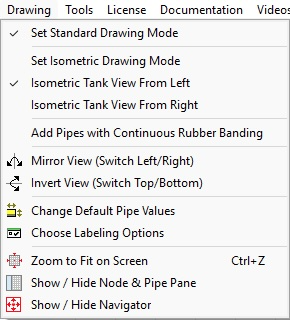
Menu Items
|
Description
|
Set Standard Drawing Mode
|
Set rectangular grid drawing mode
|
Set Isometric Drawing Mode
|
Set isometric grid drawing mode
|
Isometric Tank View From Left
|
Show isometric Tanks viewed from left
|
Isometric Tank View From Right
|
Show isometric Tanks viewed from right
|
Add Pipes with Continuous Rubber Banding
|
Enable / disable drawing pipes using continuous rubber banding.
|
Mirror View (Switch Left/Right)
|
Mirror the complete drawing
|
Invert View (Switch Top/Bottom)
|
Invert the complete drawing
|
Change Default Pipe Values
|
Opens the Pipe Data tab of the Configuration Options dialog. Use the Pipe Data tab to define default values for the next pipe to be drawn in the pipe system.
|
Choose Labeling Options
|
Opens the Labels tab of the Configuration Options dialog. Use the Labels tab to define how the pipe system drawing is labelled.
|
Zoom to Fit on Screen
|
Resize the drawing and center in the visible drawing area
|
Show / Hide Node & Pipe Pane
|
Toggles the visibility of the Node & Pipe Pane.
|
Show / Hide Navigator
|
Toggles the visibility of the Navigator.
|