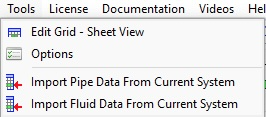
Figure 9  Tools Menu

Menu Items
Description
Edit Grid  – Sheet View

Opens the Edit Grid. Use the Edit Grid to amend data for Pipes, Tanks, End Pressures, Nodes, FCVs, PRVs, BPVs, Cv Values, Kv Values, Fixed Losses, Pumps (Fixed Flow), Pumps (Fixed Head) and Pumps (Curve). 

The data in the grid may be over typed with new data – changes will be made immediately as each item of data is amended. 

Options

Opens the Configuration Options dialog. Use the Configuration Options to configure the pipe system. 

Import Pipe Data from Current System

Imports into the pipe database any unknown pipe data defined in the system of the active tab.

Import Fluid Data from Current System

Imports into the fluid database any unknown fluid data defined in the system of the active tab.