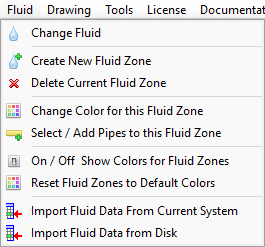
Menu Items
|
Description
|
Change Fluid
|
Opens the Fluid Data screen. Use the Fluid Data screen to define the fluid for the selected fluid zone.
|
Create New Fluid Zone
|
Opens the Fluid Data screen to select a fluid for a new Fluid Zone
|
Delete Current Fluid Zone
|
Delete the current fluid zone from the system. All pipes that previously contained this fluid will now contain the fluid from zone 1.
|
Change Color for this Fluid Zone
|
Select a background highlight color for this fluid zone.
|
Select / Add Pipes to this Fluid Zone
|
Display the fluid zone selection rectangle. Click and drag the rectangle to enclose the Pipes to be set to the current fluid zone
|
On / Off Show Colors for Fluid Zones
|
Toggle the fluid zone background highlight colors on or off.
|
Reset Fluid Zones to Default Colors
|
Reset all fluid zone colors to the default color for each fluid zone.
|
Import Fluid Data from Current System
|
Imports into the fluid database any unknown fluid data defined in the system of the active tab.
|
Import Fluid Data from Disk
|
Open the Import Fluid Data dialog. Allows browse of folders and files to select and then import fluid data into the fluid database.
|