

Unknown Pipe Data
If the selected Pipe is defined with a material that is not present in the Pipe Database, an information panel is displayed. This panel alerts the user to the undefined material as illustrated in Figure 21.

If the system in the currently active tab contains any unknown pipe materials and/or pipe sizes, the Unknown System Pipe Data information panel is displayed and the From Current System option on the Import Pipe Data sub-menu is enabled.
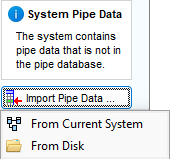
Figure 22 Unknown System Pipe Data Information Panel & Import Menu
Clicking From Current System will initiate the pipe data import process.
See Section: Pipe Data Import > Import Pipe Data from a System for further information.
Clicking From Disk will display the Open Dialog allowing you to select one or more valid pipe data files with a .pfpi or .pfpi extension.
See Section: Pipe Data Import > Import Pipe Data from Disk for further information.