

Pump Data
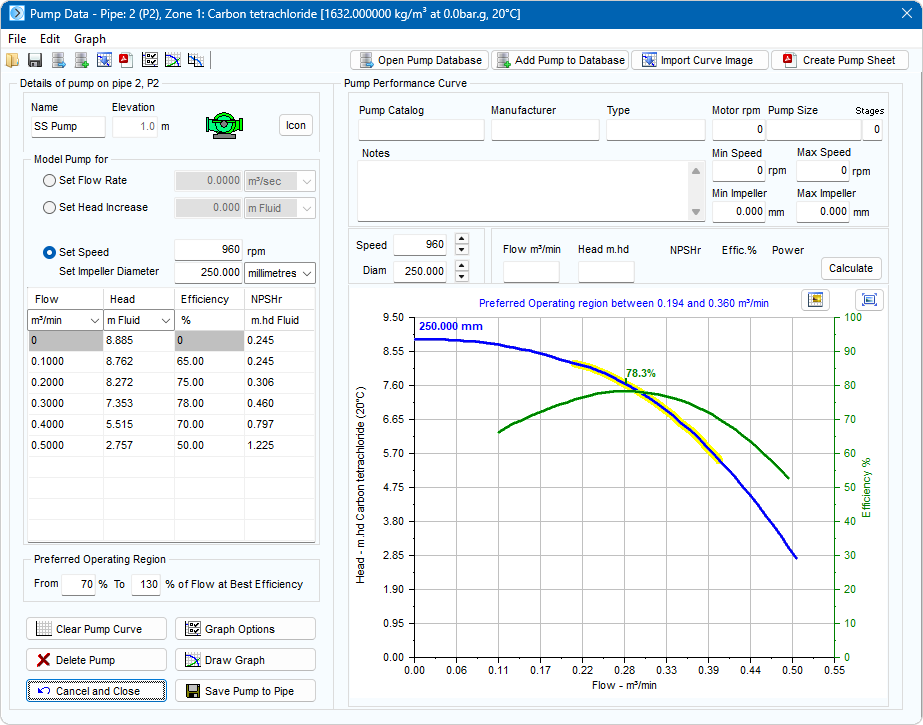
The main features of the Pump Data screen are listed in the table below.
See Section: Pump for further information of the Graph Options, the Pump Data Menu options and the options for opening the Pump Database, adding a Pump to the Pump Database, Import of a Curve Image and creating a Pump Data Sheet.
|
Feature |
Description |
|
Name |
Name of the Pump. |
|
at Elevation |
Elevation of the Pump. |
|
Pump Scroll buttons |
Choose symbol for the Pump. |
|
Set Flow Rate |
Enter flow rate to model a Pump with a fixed flow rate |
|
Set Head Increase |
Enter a head or pressure to model the additional motive force from a Pump |
|
Set Speed (rpm) |
Operating speed of a Pump with a performance curve. |
|
Set Impeller Diameter |
Set impeller diameter size & units |
|
Flow |
Flow rate values for operating range of the Pump. Displayed in units selected from dropdown list. |
|
Head |
Head generated for each of the flow rate entries. Displayed in units selected from dropdown list. |
|
Efficiency |
Efficiency of the Pump at each of the operating data points. |
|
NPSHr |
The Net Positive Suction Head requirement at the inlet of the Pump for the flow rate value. |
|
From (% of BEP) |
Start of preferred operating region. |
|
To (% of BEP) |
End of preferred operating region. |
|
Clear Pump Curve |
Clear the Pump data. |
|
Delete Pump |
Remove the Pump from the Pipe currently selected in the drawing pane. |
|
Cancel and Close |
Close the dialog without saving any changes |
|
Graph Options |
Opens additional graph options customization dialog. Allows creation of additional data curves and adjustment of Iso efficiency lines. |
|
Draw Graph |
Draw a Pump graph based on entered data points. |
|
Save Pump to Pipe |
Add the Pump to the Pipe currently selected in the drawing pane. |
|
Pump Catalog |
The name of the Pump catalog. |
|
Manufacturer |
The name of the Pump manufacturer. |
|
Type |
The type of Pump. |
|
Motor rpm |
The motor speed. |
|
Pump Size |
The Pump size reference. |
|
Stages |
The number of Pump stages. |
|
Notes |
Notes about the Pump. Notes can be up to 200 characters. |
|
Min Speed |
The minimum operating speed of the Pump. |
|
Max Speed |
The maximum operating speed of the Pump. |
|
Min Impeller |
The minimum impeller diameter for the Pump. |
|
Max Impeller |
The maximum impeller diameter for the Pump. |
|
Speed (rpm) |
Operating speed of the Pump impellor diameter for the duty curve. |
|
Diam |
The diameter of the Pump impeller, in the units shown. |
|
Flow |
The flow rate of the Pump duty point, in the units shown. |
|
Head |
The head produced by the Pump at the duty point, in the units shown. |
|
NPSHr |
The Net Positive Suction Head requirement at the inlet of the Pump for the flow rate at the duty point. |
|
Effic. % |
The Pump efficiency at the duty point. |
|
Power |
The shaft power required at the duty point. |
|
Calculate (Button) |
Click to calculate the duty point details for an entered flow rate or head requirement. |
|
Logo (Button) |
Add a logo to the Pump graph image |
|
Expand (Button) |
Expand graph to show in full window |