

Configuring the System Results
Once a pipe system is calculated and solved, the calculated results are displayed with the pipe system in the Drawing Pane. The options selected on the Labels tab of the Configuration Options dialog determine which result values are displayed in the Drawing Pane. By default, the calculated flow and pressure values are displayed for each Pipe in the system.
You can also reconfigure the units for the pipe system results on the Units tab of the Configuration Options dialog. You can access the Units tab of the Configuration Options dialog by selecting
Specify Units from the Units menu, or by clicking the Choose Units button,  , on the toolbar, or clicking the Choose Units button in the Results dialog.
To configure the pipe system labelling for results:
- Click the Choose Label button,
 , on the tool bar, to open the Labels tab of the Configuration Options dialog.
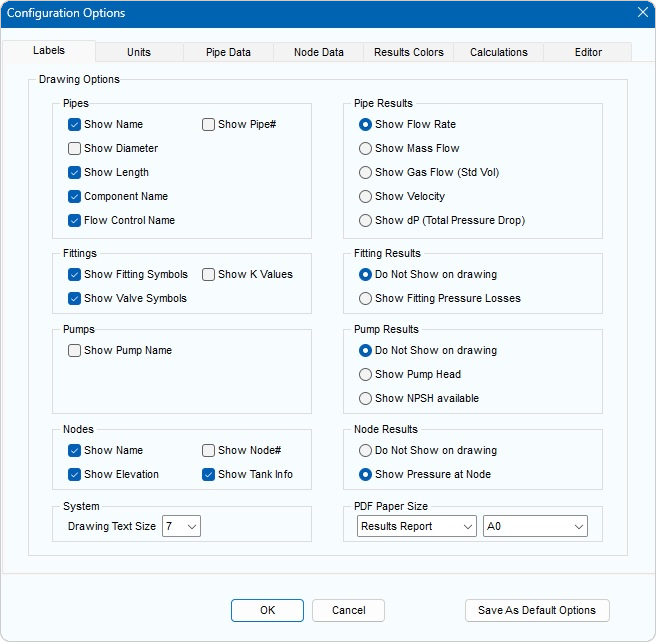
Figure 159 Configuration Options Dialog – Labels Tab
- Click one of the labelling options in the Pipe Results, Fitting Results, Pump Results and Node Results sections to determine which of the pipe system’s calculation results are displayed in the Drawing Pane.
- Click OK to close the Configuration Options dialog and apply your changes to the results displayed in the Drawing Pane.
To reconfigure the units used in a pipe system and its calculated results:
- Click the Choose Units button,
 , in the Results dialog or on the tool bar, or select Specify Units from the Units menu to open the Units tab of the Configuration Options dialog.
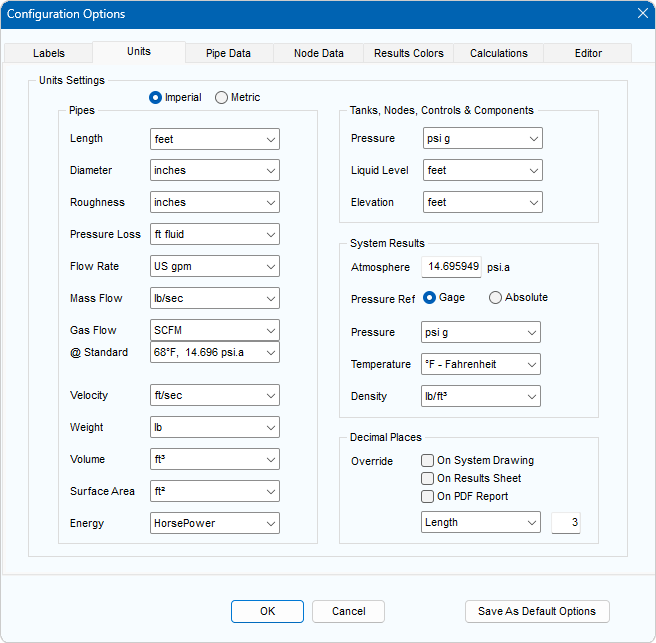
Figure 160 Configuration Options Dialog – Units tab
- Select the required units for each item.
Do not click the Imperial or Metric option in the Change All Units section of the Units tab, unless you want to change the universal unit setting and reset all the units currently defined on the Units tab.
NOTE: When you change the universal unit setting, it converts all unit values to the unit type selected, and all values on the Units tab of the Configuration Options dialog are converted to the fields’ default values. For example, if you are changing the universal setting from imperial to metric, all values, including any imperial units selected on the Units tab of the Configuration Options dialog, are converted to metric. All field values on the Units tab are also reset to their default metric value.
Click OK to close the Configuration Options dialog and apply the unit configurations to the pipe system and its results.