

Adding a Node
To add a Join Point Node to the pipe system:
- Click the Add Join Point button,
 , on the tool bar.
- When you click the Add Join Point button, the Join Point symbol is displayed next to your mouse pointer when the pointer is in the Drawing Pane.
- Click on the place on the Drawing Pane where you want to add a Join Point.
- The Join Point is added to the system and is selected on the Drawing Pane. Define the Join Point’s name, elevation, and volume demand in and/or demand out in the Node Pane.
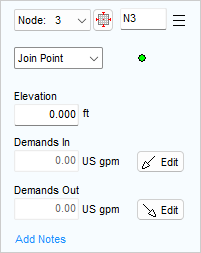
Figure 55 Node Pane for Join Points
- Type the Join Point’s name in the Node field.
- Join Point is automatically selected in the Type list.
- Type the elevation of the Join Point in the Elevation field
- If the system has a required demand flow at the Join Point, click one of the Edit buttons to open the Flow Demands dialog.
- You can enter either an In-Flow or an Out-Flow demand at the Join Point on the Flow Demands dialog. Both Edit buttons in the Node Pane open the Flow Demands dialog.
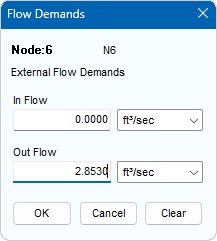
Figure 56 Set Flow Demand Dialog
- Type the required flow rate for the fluid entering the system at the Join Point in the In Flow field. (if there is in-flow then usually the out-flow field will be set at zero).
- Type the required flow rate for the fluid leaving the system at the Join Point in the Out Flow field. (if this out-flow is a point of discharge then usually the in-flow field here will be set at zero).
- Click OK to add the Join Point’s Demand Flow.
- To add any applicable notes regarding the Join Point, click Add Notes and enter the text in the Notes field.
- To add additional Join Points to the system, repeat Steps 3 – 12.
Note:
Demand Flows specify fluid flow that is entering the system from an external source or that is leaving the system to an external system (or discharging or being taken out of the existing system at the pressurised condition of the associated node, to some external system).
Demand Flows DO NOT control the flow at a particular point in the system (FCVs are used for this), unless they are placed on a Node which only has one connecting Pipe (in this case they the define the flow in or out of that Node, which in turn effectively determines the flow rate in the single connecting Pipe).