

Variable Speed and Change to Impeller Size
The pump model may be enhanced to predict the pump performance for a range different operating speeds & different impeller sizes.
To define the limits for the pump performance, enter the minimum & maximum operating speed data, and the minimum & maximum size of the impeller diameter.
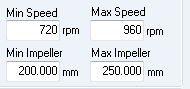
Figure 98 Pump Speed and Impeller Data
Click the ‘Draw Graph’ button to re-draw and show the new operating range.

The pump graph will be re-drawn by using standard affinity laws to predict the flow & head performance for the maximum & minimum impeller diameters.
The ‘Graph Options’ button provides access to additional settings that configure the color and display of items on the graph, and it also provides access to allow bespoke configuration of the predicted pump performance data, so that it can be matched to a pump’s real-world performance as detailed on a pump manufacturers graph and data sheet.

The pump graph can be set to display the Design Curve, Design Point, Operating Envelope, System Curve, Preferred Operating Region, and Efficiency Curve.
Shaft Power and NPSHr graphs can be displayed below the main performance graph.
Efficiency data can also be displayed on the graph, either as a single line for a specific pump curve, or as a series of iso efficiency lines that show efficiency performance across a range of impeller sizes
Pump Power Note:
Power shown on the pump screen is shaft power (power consumed by the pump). Shaft power is the mechanical power delivered to the pump shaft by the motor. Pump hydraulic power is the useful power transferred to the fluid after accounting for the power lost due to efficiency of the pump. Shaft power is always greater than the hydraulic power.
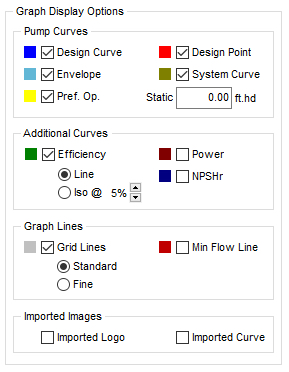
If a logo image has been imported, this can be included on or excluded from the pump graph by selecting the ‘Imported Logo’ checkbox in Graph Options.
If a pump curve image has been imported, this can be included on or excluded from the background of the pump graph by selecting the ‘Imported Curve’ checkbox in Graph Options. On the Pump Graph itself, the imported pump curve image can also be faded in and out as required.