

Using the Pipe Pop-up menu while drawing
In Pipe Flow Expert, you can change some of the features of the selected Pipe by using the Pipe Pop-up menu.
Select a Pipe (left click) and then click the right mouse button to display the Pipe Pop-up menu.
Select the option that you require and click to perform the action.
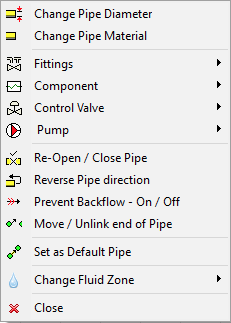
|
Feature |
Description |
|
Change Pipe Diameter |
Opens the Pipe Diameter screen and displays the pipe sizes for the current material. |
|
Change Pipe Material |
Opens the Pipe Data screen and displays the Pipe Material Database. |
|
Fittings |
Opens the Pipe Fittings sub-menu. |
|
Component |
Opens the Component sub-menu. |
|
Control Valve |
Opens the Control Valve sub-menu. |
|
Pump |
Opens the Pump sub-menu. |
|
Re-Open / Close Pipe |
Open a closed Pipe / Close a Pipe. |
|
Reverse Pipe Direction |
Reverse the flow direction of a Pipe. |
|
Prevent Backflow – On / Off |
Tag a Pipe to prevent backflow. |
|
Move / Unlink end of Pipe |
Unlink the end of the Pipe and allow re-positioning |
|
Set as Default Pipe |
Use the selected pipe data as the Default Pipe for drawing new Pipes. |
|
Change Fluid Zone |
Change the fluid zone associated with the Pipe. |
|
Close |
Close the Pipe pop-up menu. |
Pipe Pop-up Fittings sub-menu
Select Fittings on the Pipe pop-up menu to display the Fittings sub-menu.
The sub-menu options are context sensitive and will be visible and/or enabled/disabled depending upon whether there are Fittings on the selected Pipe.
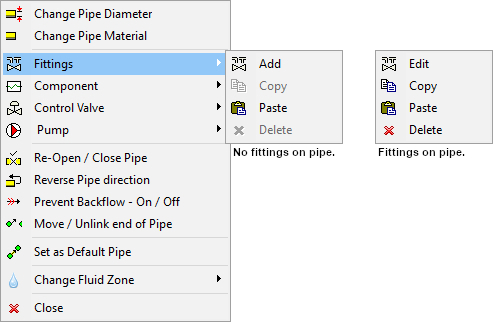
Figure 63 Pipe Pop-up Fittings sub-menu
|
Feature |
Description |
|
Add |
Visible when there are no Fittings on the Pipe. |
|
Edit |
Visible when there are Fittings on the Pipe. |
|
Copy |
Enabled when there are Fittings on the Pipe. |
|
Paste |
Enabled when Fittings have been copied to the clipboard using the copy option. |
|
Delete |
Enabled when there are Fittings on the Pipe. |
Pipe Pop-up Component sub-menu
Select Component on the Pipe pop-up menu to display the Component sub-menu.
The sub-menu options are context sensitive and will be visible and/or enabled/disabled depending upon whether there is a Component on the selected Pipe.
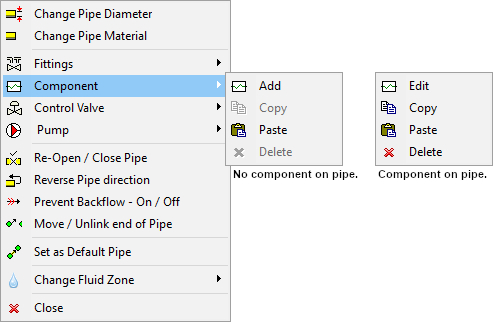
Figure 64 Pipe Pop-up Component sub-menu
|
Feature |
Description |
|
Add |
Visible when there is no Component on the Pipe. |
|
Edit |
Visible when there is a Component on the Pipe. |
|
Copy |
Enabled when there is a Component on the Pipe. |
|
Paste |
Enabled when a Component has been copied to the clipboard using the copy option. |
|
Delete |
Enabled when there is a Component on the Pipe. |
Pipe Pop-up Control Valve sub-menu
Select Control Valve on the Pipe pop-up menu to display the Control Valve sub-menu.
The sub-menu options are context sensitive and will be visible and/or enabled/disabled depending upon whether there is a Control Valve on the selected Pipe.
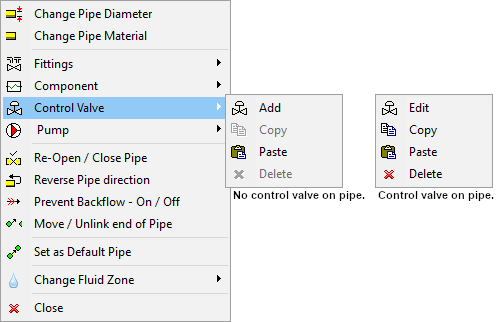
Figure 65 Pipe Pop-up Control Valve sub-menu
|
Feature |
Description |
|
Add |
Visible when there is no Control Valve on the Pipe. |
|
Edit |
Visible when there is a Control Valve on the Pipe. |
|
Copy |
Enabled when there is a Control Valve on the Pipe. |
|
Paste |
Enabled when a Control Valve has been copied to the clipboard using the copy option. |
|
Delete |
Enabled when there is a Control Valve on the Pipe. |
Pipe Pop-up Pump sub-menu
Select Pump on the Pipe pop-up menu to display the Pump sub-menu.
The sub-menu options are context sensitive and will be visible and/or enabled/disabled depending upon whether there is a Pump on the selected Pipe.
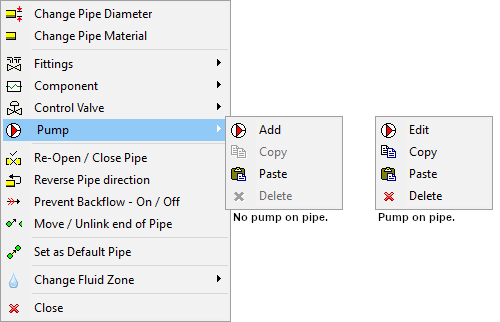
Figure 66 Pipe Pop-up Pump sub-menu
|
Feature |
Description |
|
Add |
Visible when there is no Pump on the Pipe. |
|
Edit |
Visible when there is a Pump on the Pipe. |
|
Copy |
Enabled when there is a Pump on the Pipe. |
|
Paste |
Enabled when a Pump has been copied to the clipboard using the copy option. |
|
Delete |
Enabled when there is a Pump on the Pipe. |