

Registration and Licensing Information
Pipe Flow Expert is a software package that is provided for use on personal computer systems.
Installation
When the software is installed, it generates a unique product code that is shown on the Software License dialog when you run the program. A matching license code must be entered to fully enable and license the software.
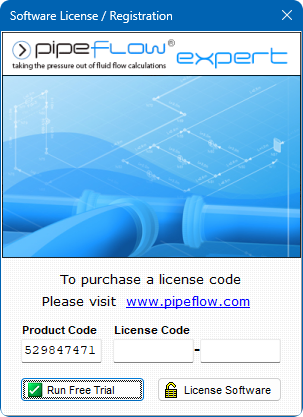
Figure 1 Pipe Flow Expert License Software
Purchasing a License
Each installation of the Pipe Flow Expert software requires a license code to be entered to fully activate the program. Until the license code is entered the software can only be used in trial mode.
License codes can be purchased from www.PipeFlow.com
Standard licensing and pricing options are shown on the web site at www.pipeflow.com.
You do not require an internet connection when licensing and enabling the software. The software does not need an internet connection to operate.
Moving a License
We allow a user to move the license to another machine. The old license is de-activated which generates a License Removal Confirmation Number. We then provide a new license code for a new installation of the software. This service is provided at no further cost as part of the Annual License fee which also includes support.
Network Licensing
The software can be operated over a network and used by a number of concurrent users. Network installation is simple and only requires that the software is installed to a shared network drive. Each user then runs the program as normal from the shared drive. When licensing the program you will need to purchase a software license that supports the maximum number of concurrent users that you require.
Please email info@pipeflow.com with your network licensing requirements to obtain a competitive quote for your specific needs.
Software Distribution
All our software is provided via download from our web site at www.pipeflow.com. This guarantees that you are always installing the latest version of the software.
When you purchase a program from our web site, you will automatically be emailed with a unique purchase token and an invoice/receipt that confirms your purchase. This is all you need for proof of purchase and we will always be able to confirm your purchase in our database.
We also sell a license to use a copy of the Pipe Flow Expert software on a USB drive. When this option is purchased, we send you a ‘Pipe Flow’ branded USB drive and allow you to license this. This provides a completely portable copy of the software. There is nothing to install. The USB drive can be plugged in to any Windows based computer and the Pipe Flow Expert software can then be run directly from the USB drive, up into the memory of the local computer.
Summary
- The Pipe Flow Expert software can be downloaded and installed for a free trial.
- A license code can be purchased from our web site at www.pipeflow.com that will enable use of the software for an initial period of time (normally 12 months).
- A user can be up and running with a licensed version of the software within a few minutes.
- An Annual License fee must be paid to extend the license to use the software for a further 12 months, once the initial 12 month license period ends. The Annual License fee can be paid at www.pipeflow.com and is usually about 15% of the cost of the initial 12 month license fee.
- Software support and maintenance, including technical assistance, help with modeling issues and free upgrades to new releases, are provided for free while you are running a licensed copy of the Pipe Flow Expert software. This ensures that you will always be able to use the latest version of the software.