

Labels Tab
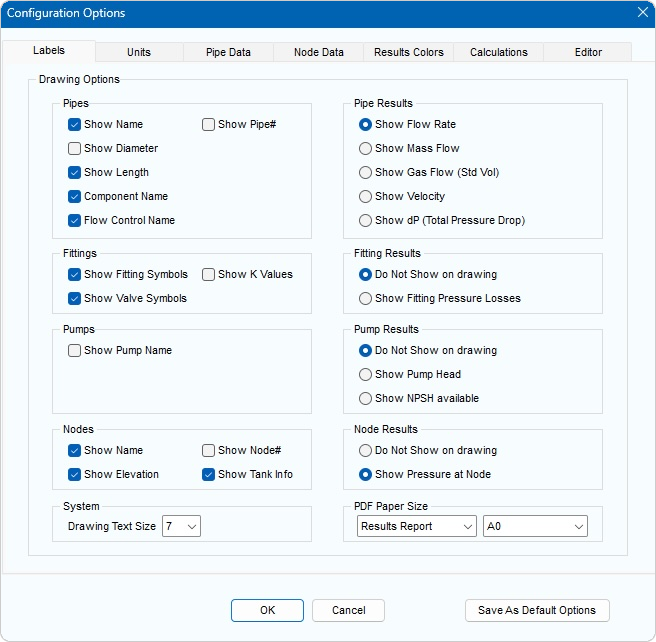
Figure 29 Configuration Options Dialog - Labels Tab
|
Feature |
Description |
|
Pipes: Show Name |
Show name of the Pipe on the drawing. |
|
Pipes: Show Pipe # |
Show the Pipe number on the drawing. |
|
Pipes: Show Diameter |
Show diameter of the Pipe on the drawing. |
|
Pipes: Show Length |
Show length of the Pipe on the drawing. |
|
Pipes: Component Name |
Show Component name on the drawing. |
|
Pipes: Flow Control Name |
Show Flow Control name on the drawing. |
|
Fittings: Show Fitting Symbols |
Show Fitting symbol |
|
Fittings: Show Valve Symbols |
Show Valve symbol |
|
Fittings: Show K Values |
Show total K value on the drawing, for all Fittings on the Pipe. |
|
Pumps: Show Pump Name |
Show Pump name on the drawing. |
|
Nodes: Show Name |
Show the name of Node on the drawing. |
|
Nodes: Show Elevation |
Show the Node elevation on the drawing. |
|
Nodes: Show Tank Info |
Show the Tank information on the drawing. |
|
Nodes: Show Node # |
Show the Pipe number on the drawing. |
|
Pipe Results: Show Flow Rate |
Show the volume flow rate on drawing. |
|
Pipe Results: Show Mass Flow |
Show the mass flow rate on drawing. |
|
Pipe Results: Show Gas Flow (Std Vol) |
Show the gas flow rate (at standard conditions) on the drawing. |
|
Pipe Results: Show Velocity |
Show the fluid velocity on the drawing. |
|
Pipe Results: Show dP (Total Pressure Drop) |
Show the total pressure drop of the Pipe, the Fittings and the Component on the drawing. |
|
Fitting Results: Do Not Show on drawing |
Do not show the total pressure drop of the Fittings on the drawing. |
|
Fitting Results: Show Fitting Pressure Losses |
Show the pressure drop of the Fittings on the drawing. |
|
Pump Results: Do Not Show on drawing |
Do not show the Pump results data on the drawing. |
|
Pump Results: Show Pump Head |
Show the Pump head on the drawing. |
|
Pump Results: Show NPSH available |
Show the net positive suction head available at the Pump inlet on the drawing. |
|
Node Results: Do Not Show on drawing |
Do not show the pressure at the Nodes. |
|
Node Results: Show Pressure at Node |
Show the pressure at the Nodes on the drawing. |
|
System: Drawing Text Size |
Select the font size to display text on the drawing. |
|
PDF Paper Size |
Select the paper size to use for the Results Report, Pump Sheet and System Drawing PDF documents. |
|
Save As Default Options |
Save the current Labels, Units, Pipe Data, Results Colors & Editor options as defaults for a new system. See Section: System Options > Default Options for further information. |
|
OK |
Confirm changes to configuration options. |
|
Cancel |
Close the labels tab without making any changes. |


