

Editor Tab
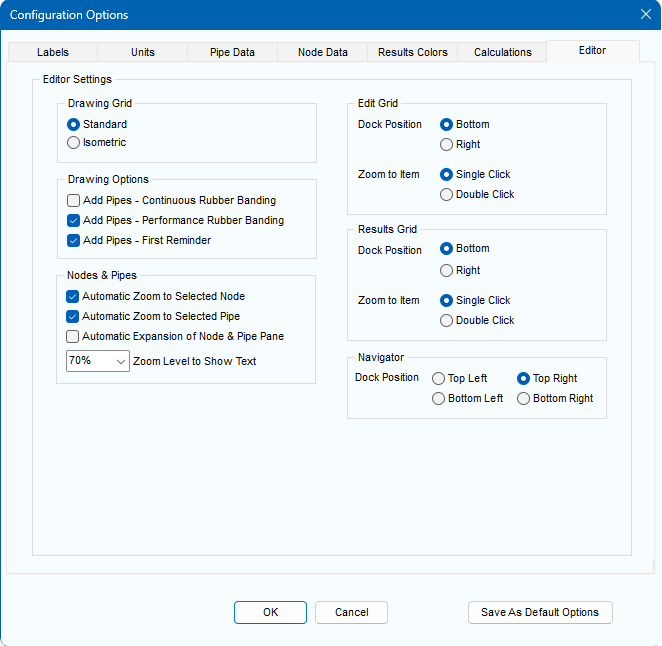
Figure 35 Configuration Options Dialog - Editor Tab
|
Feature |
Description |
|
Drawing Grid |
Set system drawing to Standard or Isometric view. |
|
Drawing Options: Add Pipes – Continuous Rubber Banding |
Draw Pipes using continuous rubber banding. |
|
Drawing Options: Performance Rubber Banding |
Draw Pipes using performance rubber banding; provides more responsive rubber banding when working with large systems. |
|
Drawing Options: Add Pipes – First Reminder |
Display reminder about the Default Pipe when drawing the first pipe of a new system. |
|
Nodes & Pipes: Automatic Zoom to Selected Node |
Set whether the selected Node is zoomed to on the system drawing when selected on the Node & Pipe Pane. |
|
Nodes & Pipes: Automatic Zoom to Selected Pipe |
Set whether the selected Pipe is zoomed to on the system drawing when selected on the Node & Pipe Pane. |
|
Nodes & Pipes: Automatic Expansion of Node & Pipe Pane |
Set whether the Node & Pipe Pane is automatically expanded when a Node or Pipe is selected on the drawing. |
|
Nodes & Pipes: Zoom Level to Show Text |
Set the zoom level at which the text labels for the nodes & pipes will be visible on the System Drawing. |
|
Edit Grid: Dock Position |
Position the Edit Grid at the bottom or right-hand side of the application window. |
|
Edit Grid: Zoom to Item |
Set whether the selected item on the Edit Grid is zoomed to with a single or double mouse click. |
|
Results Grid: Dock Position |
Position the Results Sheet at the bottom or right-hand side of the application window. |
|
Results Grid: Zoom to Item |
Set whether the selected item on the Results Sheet is zoomed to with a single or double mouse click. |
|
Navigator: Dock Position |
Position the Navigator at the top left, top right, bottom left or bottom right. |
|
Save As Default Options |
Save the current Labels, Units, Pipe Data, Results Colors & Editor options as defaults for a new system. |
|
OK |
Confirm changes to editor options. |
|
Cancel |
Close the editor options without making any changes. |