


|
Pipe Flow Expert Example Systems 37
-
The pump data may also be loaded from the pump database.
-
Click the Open Pump Database tab on the pump screen.
-
Click the browse radio button & select the 'GenericPumps_EndSuction_50Hz' folder
from the drop down list.
-
Browse the pump list and select the Generic_4x3-10H_A40_1475.pfpm' entry.
-
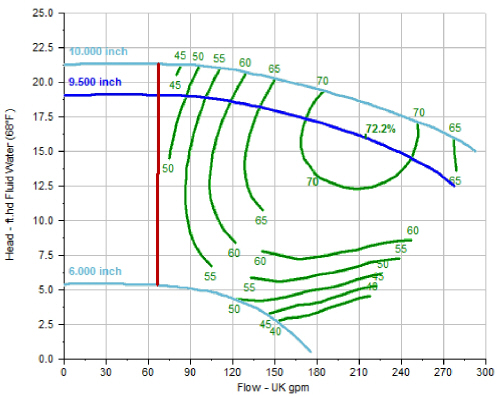
The pump performance graph will be shown.
-
Click the 'Select' button to load the pump information on to the pump data screen.
-
Amend the pump speed to 800 rpm by using the up/down adjustment arrows.
-
Amend the pump impeller diameter to 9.50 inch by using the up/down adjustment
arrows.
-
-
-
Set the pump distance 'Along pipe' to 20ft and the 'at Elevation' to 1.0 ft.
-
Click the 'Save to Pipe' button to close the Pump dialog.
-
The Pump symbol is now shown on Pipe 1.
Solving the system
-
Click the 'Calculate' button on the tool bar to find a balanced flow and a balanced pressure
state for the system.
-
The Results Log should appear and confirm that the network was solved successfully