


|
20 Pipe Flow Expert Example Systems
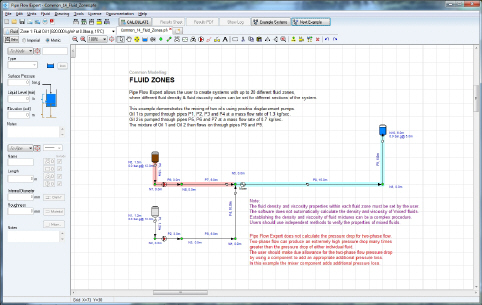
Figure 14 Common 14 - Fluid Zones
Pipe Flow Expert allows the user to create systems with up to 20 different fluid zones, where different fluid density & fluid viscosity values can be set for different sections of the system.
This example demonstrates the mixing of two oils using positive displacement pumps.
Oil 1 is pumped through pipes P1, P2, P3 and P4 at a mass flow rate of 1.3 kg/sec.
Oil 2 is pumped through pipes P5, P6 and P7 at a mass flow rate of 0.7 kg/sec.
The mixture of Oil 1 and Oil 2 then flows on through pipes P8 and P9.
Note:
The fluid density and viscosity properties within each fluid zone must be set by the user.
The software does not automatically calculate the density and viscosity of 'mixed' fluids.
Establishing the density and viscosity of fluid mixtures can be a complex procedure.
Users should use independent methods to verify the properties of mixed fluids.
In this example, the oil fluids mix together and the resulting fluid remains as a liquid, without a phase change. Some pressure loss occurs as a result of this process and the mixer component adds additional pressure loss.
Two Phase Flow:
Pipe Flow Expert does not calculate the pressure drop for two-phase flow.
If a fluid changes state (from liquid to gas, or from gas to liquid), i.e. it transitions from one phase to another, then this two-phase flow can produce an extremely high pressure drop that is many times greater than the pressure drop which would occur if the fluid remained in the same state. The user should make due allowance for two-phase flow pressure drop by using a component to add an appropriate additional pressure loss.